
Make sure you do the following before installing Frostfall 3.x:
- Back up your save games. Just in case.
- Install SKSE 1.7.3+. You can download it here or install it through Steam Workshop. (SKSE is required.)
- Install SkyUI 4.1+. (5.1 or newer is recommended.)(SkyUI is required.)
- SkyUI 4.1 – Meets the mod’s base requirements. Frostfall SkyUI Add-On will not function.
- SkyUI 4.1 with SkyUI Away – Meets the mod’s base requirements. Frostfall SkyUI Add-On will not function.
- SkyUI 5.1 – All Frostfall 3 features will work. This is the recommended configuration.
- SkyUI 5.1 with SkyUI Away – Meets the mod’s base requirements. Frostfall SkyUI Add-On will not function.
- Do not unpack Frostfall’s BSA archive once you’ve downloaded the mod. Uncompressing the archive into loose files leaves you open to upgrade issues down the road. Loose files are always loaded instead of their BSA archive equivalents, which may mean that you don’t get the latest files on upgrade and could cause certain functions of the mod to break. Only uncompress the BSA archive into loose files if you are a mod developer and you know exactly what you are doing. You have been warned. This is not a supported installation method. Unless you are a mod developer, there is no reason to unpack the mod.
- Installing the mod manually (without a mod manager) is not a supported installation method. Unless you are a mod developer, there is no reason to manually install the mod. If you aren’t using a mod manager such as Nexus Mod Manager or Mod Organizer, now would be a good time to start.
Please select the option that matches you the closest.
- Download and install the latest version of Campfire using a mod manager (Nexus Mod Manager, Mod Organizer, Wrye Bash, etc).
- Download and install Frostfall 3.x from Skyrim Nexus using a mod manager.
- (Optional) If you use SkyUI 5.1+, download and install the Frostfall SkyUI Add-On from the Frostfall Nexus page using a mod manager. This provides the most seamless gameplay experience.
Installing the mod manually (without a mod manager), and unpacking the BSA archive into your Skyrim directory, are not supported installation methods. Unless you are a mod developer, there is no reason to manually install or unpack the mod.
- Download and install the latest version of Campfire using a mod manager (Nexus Mod Manager, Mod Organizer, Wrye Bash, etc).
- Download and install Frostfall 3.x from Skyrim Nexus using a mod manager.
- (Optional) If you use SkyUI 5.1+, download and install the Frostfall SkyUI Add-On from the Frostfall Nexus page using a mod manager. This provides the most seamless gameplay experience.
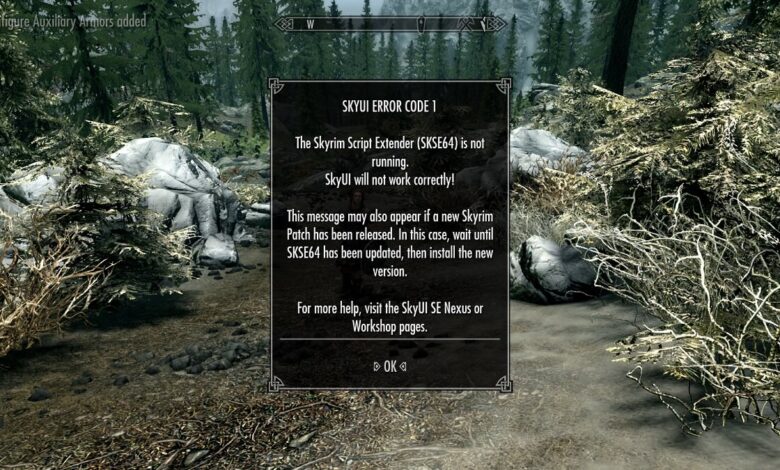
Gopher, for helping with the NMM installer and promoting SkyUI on his YouTube channel. Indie, for creating our first trailer. Lojack, for improving integration with. I started playing skyrim on the Xbox, and I simply can't play it on PC without an Xbox controller, but it seems that the SkyUI bartering system doesn't fully work when using the controller; I can't switch to my inventory to sell things. It looks like I need to press backspace to switch, but when I do, nothing happens. Requirements Nexus requirements Mod name Notes SkyUI XP32 Maximum Skeleton -XPMS Off-site requirements Mod name Notes SKSE Mods requiring this file Mod name Notes Equipping Overhaul - Wet and Cold patch Permissions and credits Credits and distribution permission Other user's assets All the assets in this file belong to the author, or are from. SkyUI will not work correctly! This message may also appear if a new Skyrim Patch has been released. In this case, wait until SKSE has been updated, then install the new version. SkyUI is a mod for The Elder Scrolls V: Skyrim created by SkyUI Team.This project aims to improve Skyrim's User Interface by making it easier to use with mouse and keyboard, less wasteful of available screen space, and nicer to look at.
Installing the mod manually (without a mod manager), and unpacking the BSA archive into your Skyrim directory, are not supported installation methods. Unless you are a mod developer, there is no reason to manually install or unpack the mod.
You can install Frostfall 3.x without starting a new game.- Make sure to update to the latest version of Campfire using a mod manager (Nexus Mod Manager, Mod Organizer, Wrye Bash, etc). You can directly install this update in an existing save game. Just uninstall the previous version and install the new version.
- Download and install Frostfall 3.x from Skyrim Nexus using a mod manager.
- (Optional) If you use SkyUI 5.1+, download and install the Frostfall SkyUI Add-On from the Frostfall Nexus page using a mod manager. This provides the most seamless gameplay experience.
Installing the mod manually (without a mod manager), and unpacking the BSA archive into your Skyrim directory, are not supported installation methods. Unless you are a mod developer, there is no reason to manually install or unpack the mod.
 You shouldn’t have to start a new game to install Frostfall 3.x into your existing save game. However, everyone’s game environment is different. If you experience significant issues, a new game may be required. If that happens, uninstall Frostfall 2.6 using your mod manager and follow the instructions for installing Frostfall 3.x fresh, above.
Begin by properly uninstalling Frostfall 2.6.
(Proper uninstallation of Frostfall is very important, or permanent, unrecoverable penalties on your character may occur.)
- Back up your save games. Do not skip this step.
- Start the game.
- If you have anything stored inside a Conjured Shelter chest, cast the spell and remove those items now. Otherwise, they will be lost.
- Go inside any building.
- Wait 30 seconds of real-time, outside of the menu system. If you have a “Frostbitten” effect in your Active Effects menu, wait for it to wear off.
- Shut down Frostfall:
- SkyUI 4.1+ Users: Open the Mod Configuration Menu, go to the Overview page, and click “Frostfall is: Enabled”. Select it and accept the prompt. It should now read, “Frostfall is: Disabled”.
- Non-SkyUI Users: Use the Survival Settings power (by pressing the Shout key, Z) and navigate to Configure, and press More… until you reach Activate / Shutdown. Click the button to shut down Frostfall.
- After exiting all of the menus, wait another 30 seconds of real-time, outside of the menu system.
- Save your game in a new slot. Make a “real” save, not a quick-save.
- Exit the game.
- Uninstall Frostfall 2.6 using your mod manager.
- Load your game.
- Ensure that all of your skills are set to their default values. If they are not, ensure that you do not have another mod that is affecting your skills. If everything looks to be in order, Frostfall 2.6 has been correctly shut down and uninstalled.
- Save your game again.
- Exit the game.
Next, install Campfire and Frostfall.
- Download and install the latest version of Campfire using a mod manager (Nexus Mod Manager, Mod Organizer, Wrye Bash, etc).
- Download and install Frostfall 3.x from Skyrim Nexus using a mod manager.
- (Optional) If you use SkyUI 5.1+, download and install the Frostfall SkyUI Add-On from the Frostfall Nexus page using a mod manager. This provides the most seamless gameplay experience.
Installing the mod manually (without a mod manager), and unpacking the BSA archive into your Skyrim directory, are not supported installation methods. Unless you are a mod developer, there is no reason to manually install or unpack the mod.
You should, in general, try to load Frostfall.esp as high in your load order as you can.
In particular, Frostfall should load before any mods that edit inns and taverns. These are mods like JK’s Skyrim by Jkrojmal and Teabag86.
This is to ensure that the Rescue system in Frostfall will transport your character to the right place if your exposure reaches maximum.
Since Frostfall adds so much to the game, it doesn’t start until you want it to. You have to enable it.
There are several ways to start Frostfall:
- Look to the stars. Staring up at the night sky for ~8 seconds (in First Person) will start the mod. Stare at the night sky between 7PM and 7AM.
- Open the SkyUI Mod Configuration Menu, go to the Overview page, and click “Frostfall is: Disabled”. The mod will begin starting up.
Once Frostfall has finished starting up, you will see a message that notes how you found a copy of a long-lost book, The Survivor’s Guide to Skyrim. (This book is purely for flavor, but does contain some helpful tips!) Once you’ve found the book, Frostfall will start.
After starting Frostfall, you can either jump right into the game (there are plenty of tutorial messages, loading screens, and MCM help text to help you along the way), or, you can browse around these pages to learn more. Start with How To Play for an introduction to all of the major mechanics of Frostfall.
Good luck!
PC games are on the rise ever since the internet became more advanced. When it comes to the best role-playing arcade games, Skyrim is perhaps the first name that comes into people’s minds. This game is very popular from the beginning. It was developed by Bethesda Game Studios. And the game is full of advanced features that you would not find in any game of this age. In this blog, we are going to talk about SKYUI error code 5. Recently, I found that most of the online forums were full of queries regarding this issue.
SKYUI is a UI mod that is often regarded to be very much PC-friendly and this mod is for Skyrim. There have been many advancements in Skyrim but you are always free to integrate all these advancements with the original version of Skyrim.
The latest version of this mod that is version 5 has many advantages. There is better crafting, a smithing menu is far better than the older version, a panel full of features, nice enchanting. The panel is so advanced that you can sort the data using this panel. But having all these features in this mod doesn’t mean that it does not have any fault. Most of the users face this issue when they play the game and by the time they open spells or inventory or the favorites.
Read more: FFXIV error 2002
One of the simplest ways to fix this issue is by fresh installing the mod on your PC. Just uninstall this mod and then install it again on your PC by following the earlier methods. Here are some fixes that you should try to fix this problem.
Get rid of the favorites section:
- This is one of the easiest methods to do this job. Just go to the settings and then enter the mod manager section. Once you are in the section, disable the favorites menu and check if you are still facing the skyui error code 5.
Find and delete the loose files:
- If there is a file overriding skyui, you may face the skyui error code 5 error on your pc. You can solve this issue by deleting those files. Follow the steps mentioned below to get rid of this situation:
- You can check these files by clicking on the warning in MCM.
- If you are unable to do it, you can easily locate these files by going to the Data/Interface folder.
- Once you have found those files, delete all of them.
- This solution is only for those who have installed inventory mods or map mods.
Use third-party mods:
- There are several situations when the problem lies in the manager of the game mod. You can solve this issue by using some third-party mod for this purpose. In many cases, whenever the user tries to open the mods menu, skyui is automatically disabled.
Check your internet connection:
- If you don’t have a proper internet connection, you may face this issue. You can solve it by correcting your internet connection. Easiest way to do it is to restart your router. Just turn Off your router and unplug it from the power socket. Once you have done it leave it for at least 5 minutes. After that, plug it back in and see whether you have solved your problem.
Make sure that the sign is in right place:
Skyui
- If any of the solutions mentioned above didn’t work for you, you should try this one. Check whether the sign is pointing towards the left side of the ESP’s first character i.e. the character to be activated.
Conclusion
How To Skyrim Mods Pc
We have discussed several ways to solve your issue of skyui error code 5. If any of them don’t work for you, try calling the help desk for more support.
How To Skyrim Vr Mods
Read more: Avast ui failed